ethereum
Staking Guides
How to Stake ETH with Cypherock X1 and cySync App
Cypherock X1 owners can stake ETH in the cySync desktop app, with Everstake providing the staking infrastructure. The process takes under 2 minutes with a transaction signed on the X1 Vault.
NOV 02, 2026
Last updated NOV 02, 2026 · V1
TL;DR
- Cypherock X1 owners can stake ETH in cySync, with Everstake as the sole integrated staking provider.
- Staking takes 8 steps and less than 2 minutes, from the Earn tab to signing on the X1 Vault.
- Every stake is verified on the X1 Vault and confirmed with your PIN.
How Does ETH Staking Work in cySync?
Cypherock X1 owners can stake ETH directly from the cySync app, with Everstake running the staking infrastructure. Read more about this integration in our partnership announcement.
Every stake is signed on the X1 Vault with a tap of an X1 Card. The X1 distributes the private key across 5 shares using Shamir’s Secret Sharing, so no single component holds the full key.
What Do You Need Before Staking ETH?
Staking from cySync requires:
- a Cypherock X1 Vault, at least 1 of its 4 X1 Cards, and the wallet PIN,
- the latest version of the cySync desktop app,
- an Ethereum account in cySync holding the ETH to stake (min 0.01 ETH) plus enough to cover the network fee.
How to Stake ETH in cySync: 8 Steps
Staking ETH in cySync takes 8 steps, from the Earn tab to an on-chain transaction signed on the X1 Vault.
1. Open the Earn tab
Open cySync and land on the Portfolio page. In the left sidebar, click on the Earn tab.
2. Choose the Ethereum account
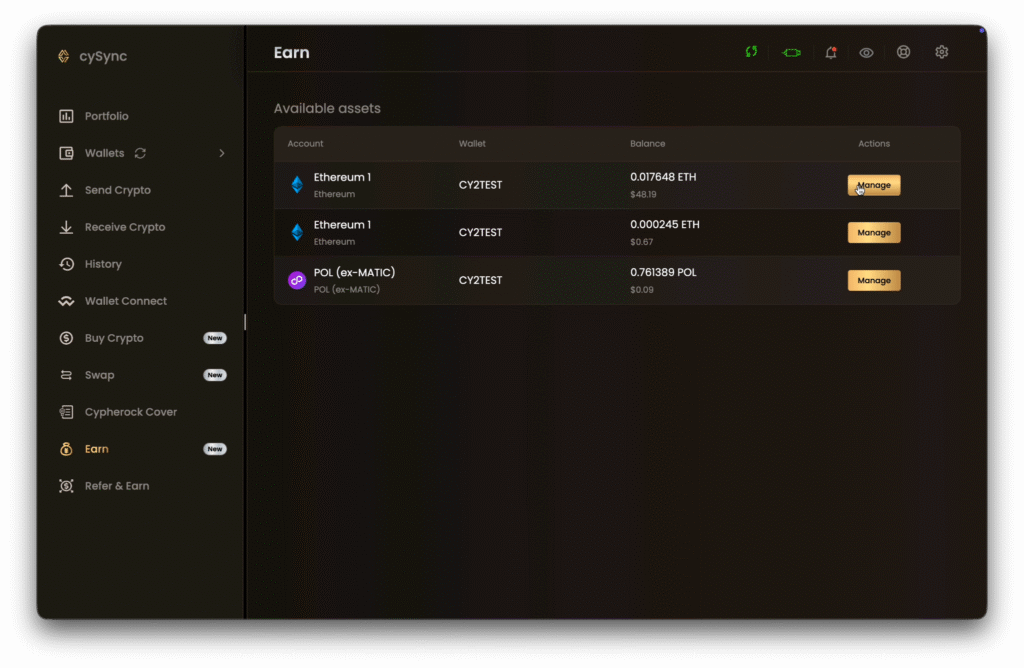
The Earn page contains every account holding a stakeable asset. Each row shows:
- Account: the asset and account name,
- Wallet: the X1 wallet holding it, with a name set by the user.
- Balance: the current balance in tokens and USD,
- Actions: a Manage button.
Click Manage on the account you’d like to stake from.
3. Review the stake page
The top of the page shows the account’s available balance and wallet. Below it, 5 position cards track the stake:
- Actively staked
- Rewards
- Pending deposit
- Unstaking queue: ETH being processed for withdrawal
- Ready to claim
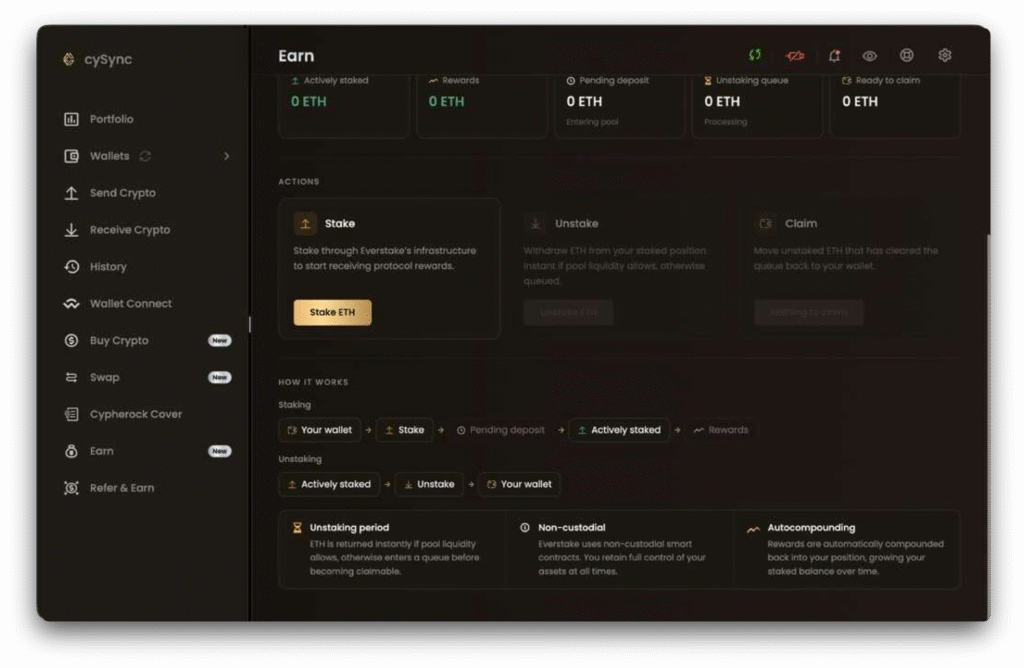
A How it works panel at the bottom traces each stage of staking and unstaking. Click Stake ETH.
4. Consent to staking with Everstake
A notice explains how staking works on the X1 with Everstake offering staking infrastructure, and technology to enable staking for cySync App users.
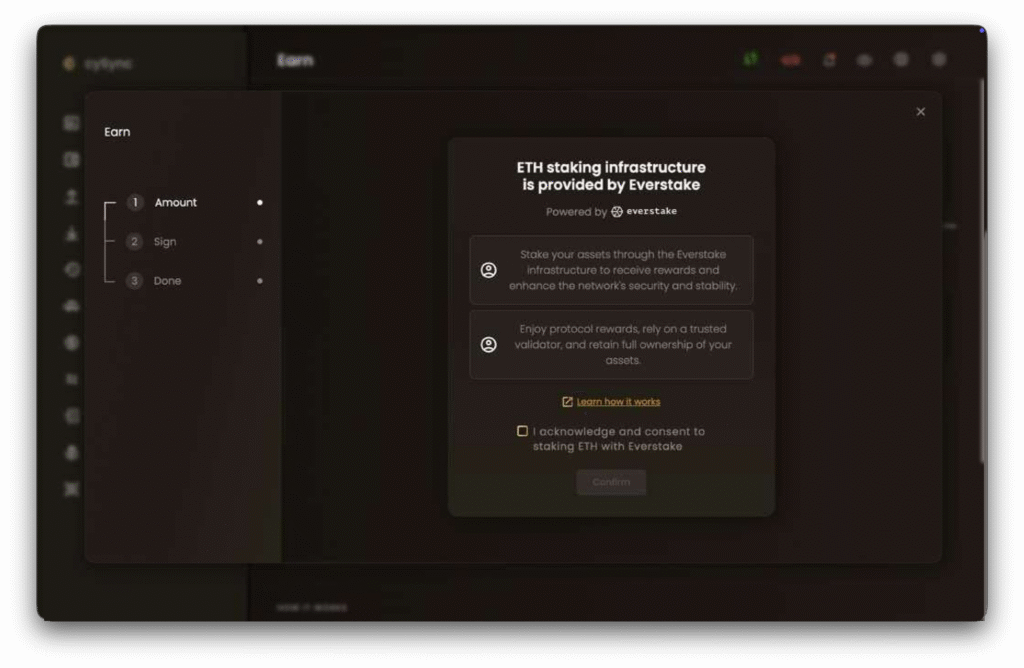
In order to proceed, tick I acknowledge and consent to staking ETH with Everstake, then click Confirm.
5. Enter the amount
Confirm the wallet and Ethereum account, then enter the amount in ETH or its USD equivalent. The 25%, 50%, and 75% buttons fill in a share of the available balance.
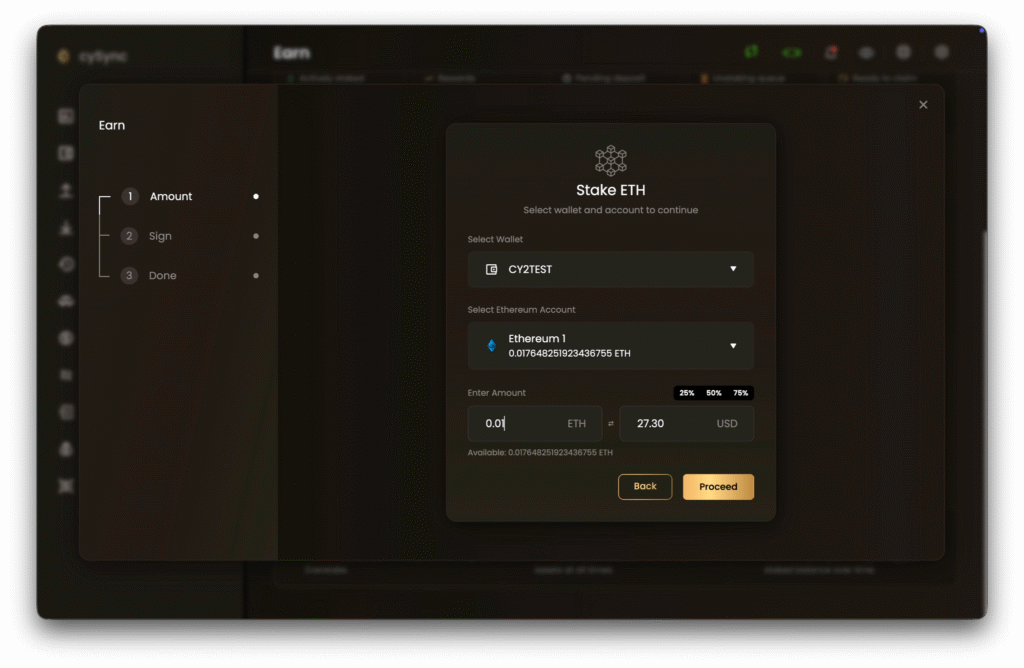
Click Proceed.
6. Set the network fee
Drag the gas price slider between Slow, Average, and Fast.
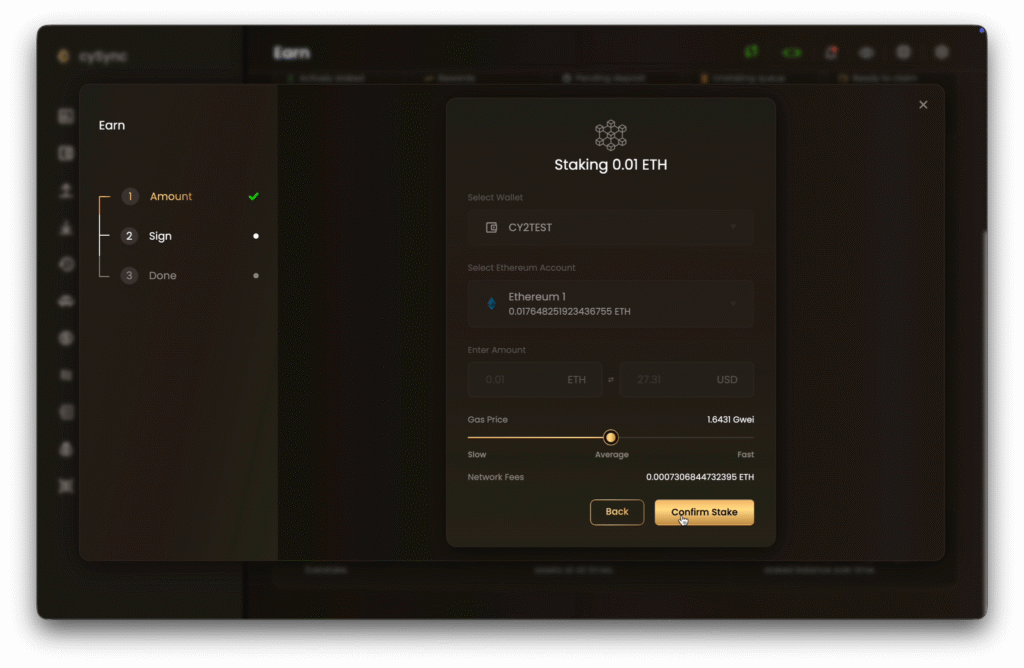
cySync shows the gas price in Gwei and the resulting network fee in ETH.
Click Confirm Stake.
7. Sign on the X1 Vault
Follow the prompts on the X1 Vault:
- Verify the coin on the X1 Vault.
- Verify the transaction details, including the amount.
- Enter your PIN
- Tap an X1 Card on the X1 Vault and enter PIN again.
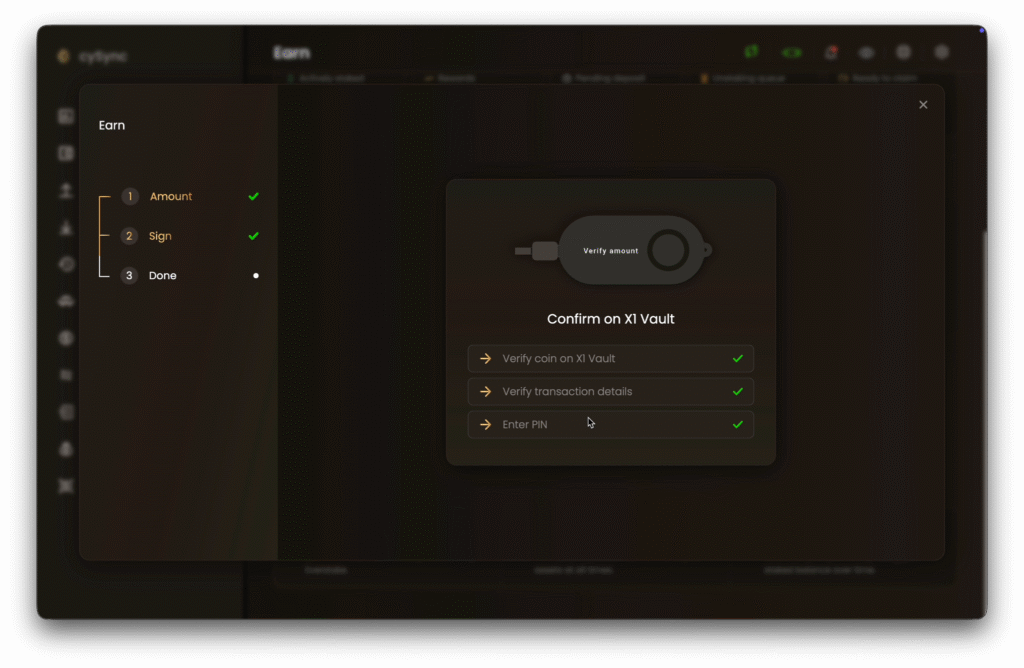
Each check turns green in cySync once completed on the device.
8. Confirm the result
Once all 3 checks are complete, cySync shows a Staking Initiated screen. The position becomes active once the transaction confirms on-chain.
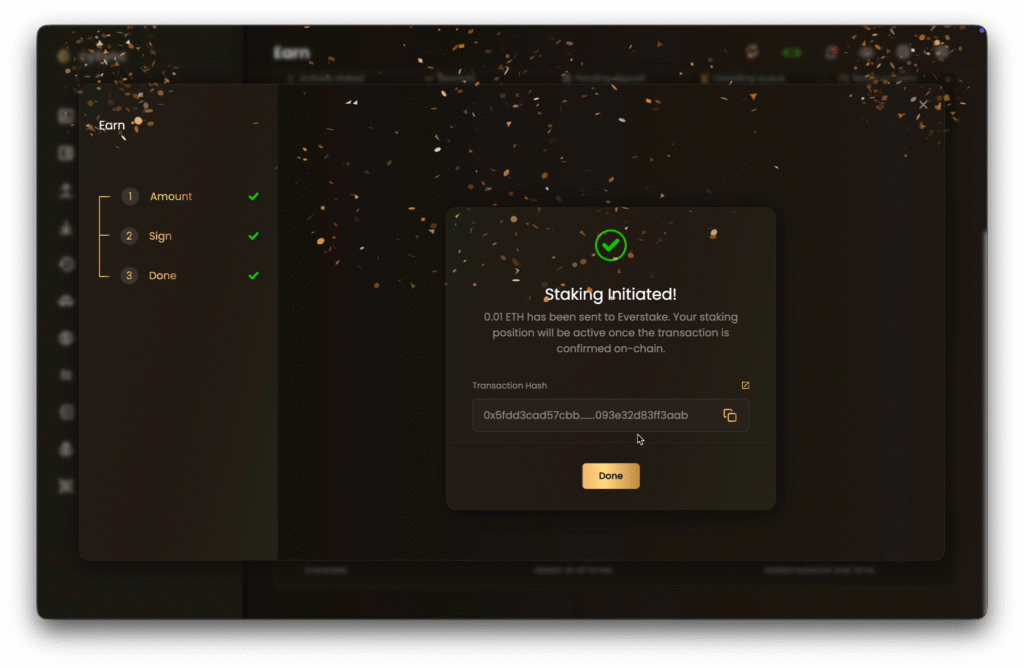
If you’d like, copy the transaction hash, or open it in a block explorer with the link icon.
How Do You Track, Unstake, and Claim ETH?
A new stake shows in Pending deposit while it is queued on-chain, then moves to Actively staked. Staking rewards appear in the Rewards card on the same page.
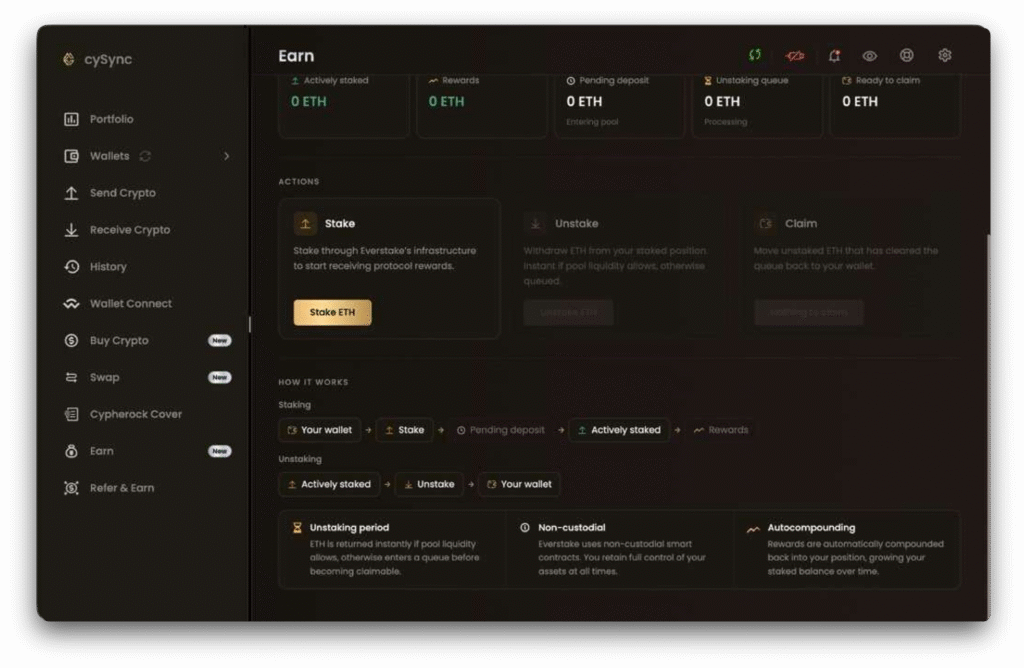
To withdraw, use the Actions section of the stake page:
- Click Unstake ETH and sign on the X1 Vault. The amount enters the Unstaking queue.
- Once processed, the amount moves to Ready to claim.
- Click Claim to return the ETH to your wallet.
Processing time in the Unstaking queue varies with Ethereum network conditions.
About Cypherock
Cypherock builds hardware wallets that aim to reduce seed phrase vulnerability. The Cypherock X1 distributes the private key into 5 shares across 1 X1 Vault and 4 X1 Cards using Shamir’s Secret Sharing, and any 2 shares recover the wallet.
Cypherock firmware is open source and audited by Keylabs and Wallet Scrutiny, with a 3.5+ year hack-free record. The X1 supports 19,000+ tokens across 10+ blockchains.
About Everstake
Everstake is a staking infrastructure provider that has historically operated 130+ networks, with $7B+ staked to date. Everstake has served 1.6M delegators through 40,000+ validator nodes.
Everstake is SOC 2 and ISO 27001 certified and GDPR compliant.
FAQ
Does my private key leave the Cypherock X1?
No. Every cySync staking transaction is signed on the X1 Vault with a PIN and an X1 Card tap, and Everstake never gets access to the private key.
Can I unstake ETH at any time?
Yes. cySync lets you initiate unstaking whenever ETH is actively staked with Everstake, and the amount passes through the Unstaking queue and protocol rules before it becomes claimable.
Where can I check my staking transaction?
cySync shows the transaction hash on the Staking Initiated screen, with a link to a block explorer. The stake also appears in cySync after on-chain confirmation.
Share with your network