Polygon
Staking Guides
How to Stake POL in cySync by Cypherock
Cypherock X1 owners can now stake POL with Everstake in the cySync app, verifying and signing every transaction on the X1 Vault.
NOV 05, 2026
Last updated NOV 05, 2026 · V1
TL;DR
- Open Earn in cySync, pick your POL account and click Manage.
- Accept the Everstake notice, enter an amount and approve POL once (first stake only).
- Confirm the stake, then verify and sign on the X1 Vault with your X1 Card and PIN.
- POL staking runs on Ethereum, so network fees are paid in ETH.
Cypherock X1 owners can stake POL with Everstake directly in the cySync app, in addition to ETH and SOL staking, and every transaction is signed on the X1 Vault. The flow takes about 2 minutes after one-time approval in the app: Amount, Approve, Stake and Done.
What Is POL Staking in cySync?
POL staking in cySync lets Cypherock X1 owners stake POL (the token of Polygon network) with Everstake directly in the cySync companion app. Every staking transaction is verified and signed on the X1 Vault, so private keys never leave the device.
Everstake as Cypherock’s exclusive staking provider, runs the validator infrastructure through the Everstake Wallet SDK. Read more about the partnership to enable staking or learn how to stake Ethereum in cySync app.
The estimated POL reward rate is about 3% APR.
Note: Protocol staking rewards are variable and depend on network conditions.
Before You Start
Check these 4 items before you open the Earn section:
- Cypherock X1 Vault and at least 1 X1 Card, with your PIN.
- The latest version of cySync, with the X1 Vault connected over USB-C.
- A POL account in cySync that holds the POL (ERC-20) on Ethereum mainnet. POL on the Polygon PoS chain needs to be bridged to Ethereum first.
- ETH on the same Ethereum account to cover network fees for the approval and stake transactions.
How to Stake POL in cySync: Step by Step
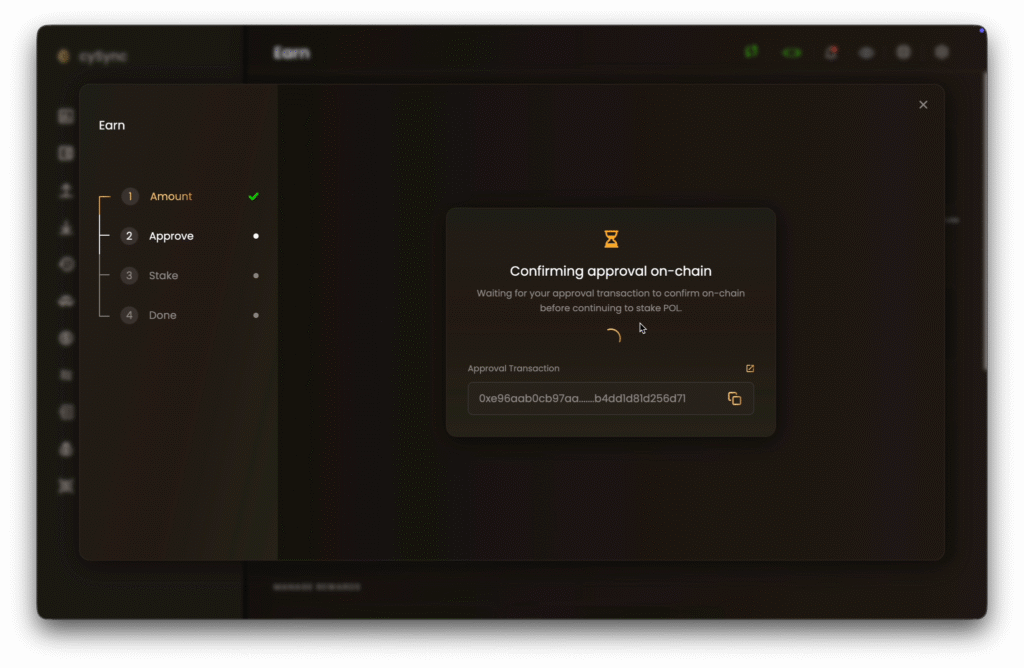
The left panel of the staking window tracks 4 stages: Amount, Approve, Stake and Done. Note: the Approve stage appears only the first time you stake POL from an account.
Step 1. Open the Earn Section
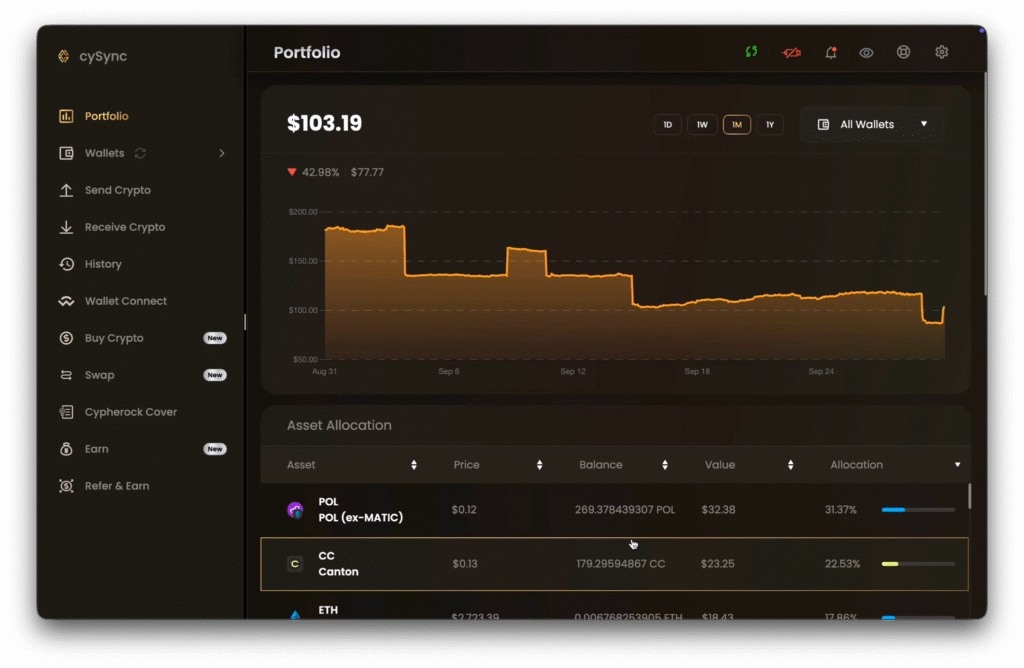
Open cySync and land on the Portfolio page. In the left sidebar, click Earn, the second-to-last option.
Step 2. Choose Your POL Account
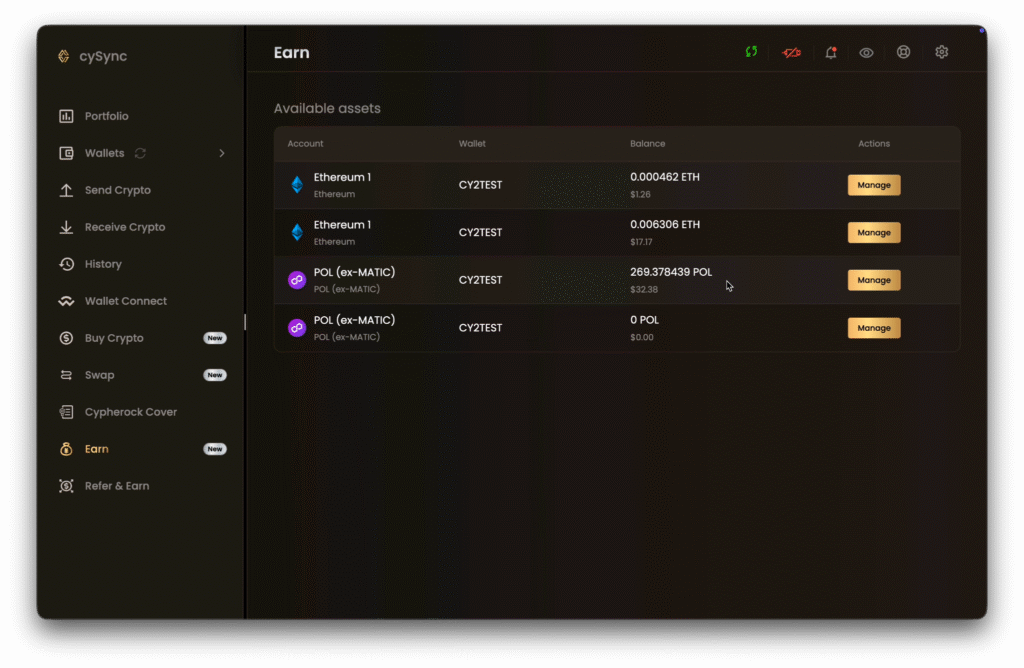
The Available assets table lists every account you can stake from, with its wallet and balance. Find the POL (ex-MATIC) account that holds your POL and click Manage.
Step 3. Review Your POL Position
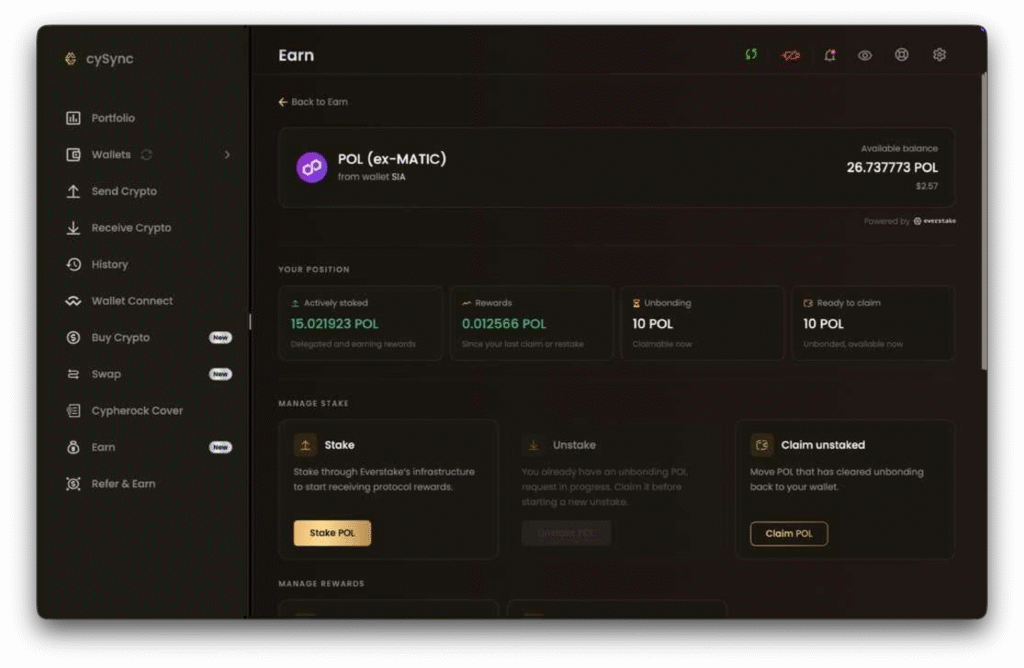
The stake page shows the available balance of the selected account and the wallet it belongs to. The Your Position section tracks 4 values: Actively staked, Rewards, Unbonding and Ready to claim.
Under Manage Stake, click Stake POL.
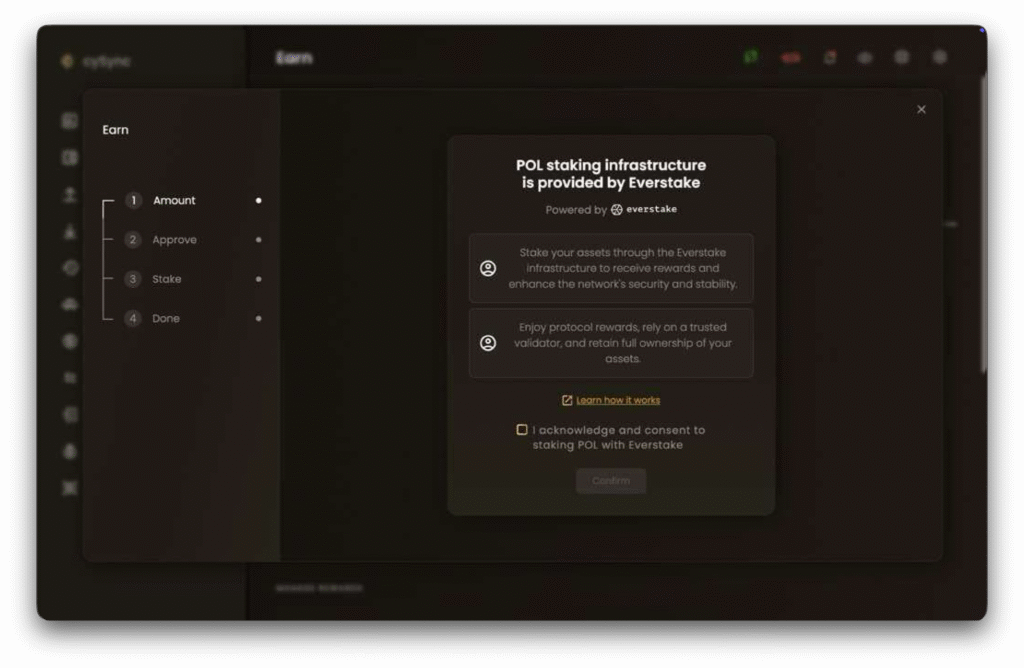
Step 4. Accept the Everstake Notice
cySync shows a notice on staking through Everstake’s infrastructure. Read it, or click Learn how it works for details.
If you agree with the process, tick ‘I acknowledge and consent to staking POL with Everstake’ and click Confirm.
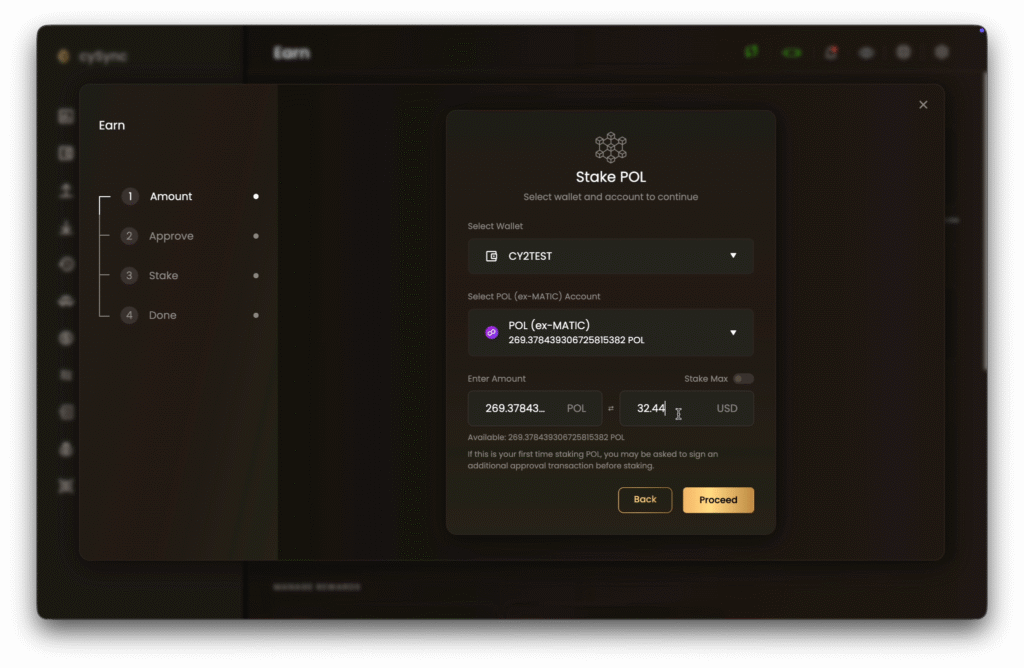
Step 5. Enter the Amount
Check the wallet and POL (ex-MATIC) account, then enter the amount in POL or USD. Turn on Stake Max to stake the full available balance if you wish.
Click Proceed.
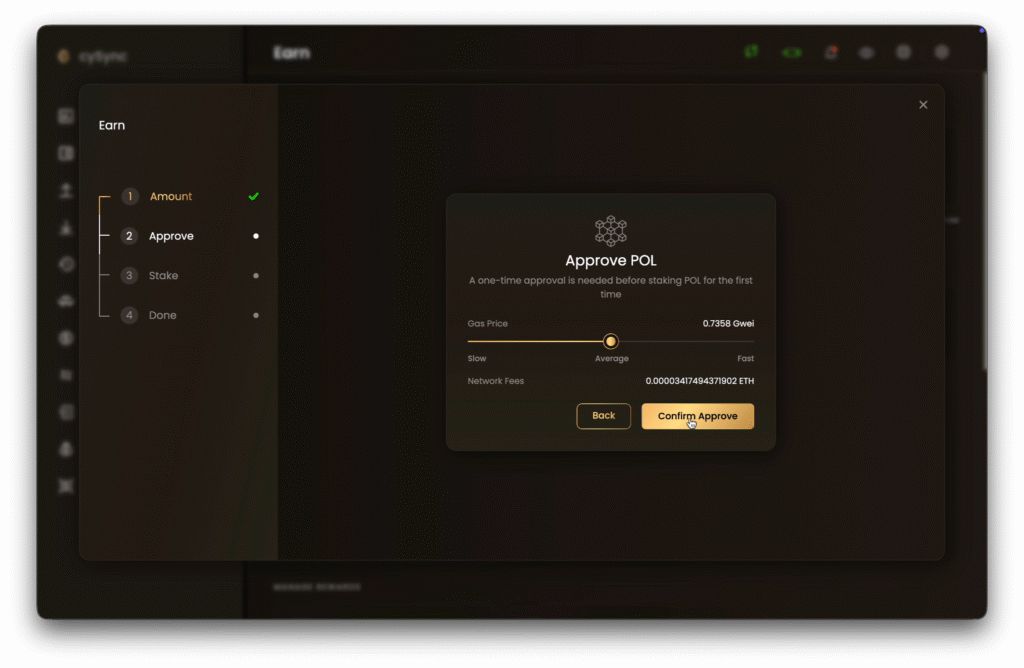
Step 6. Approve POL (First Stake Only)
The first time you stake POL, the staking contract needs a one-time approval to use your tokens. Use the Gas Price slider to set the network fee, which is paid in ETH, and click Confirm Approve.
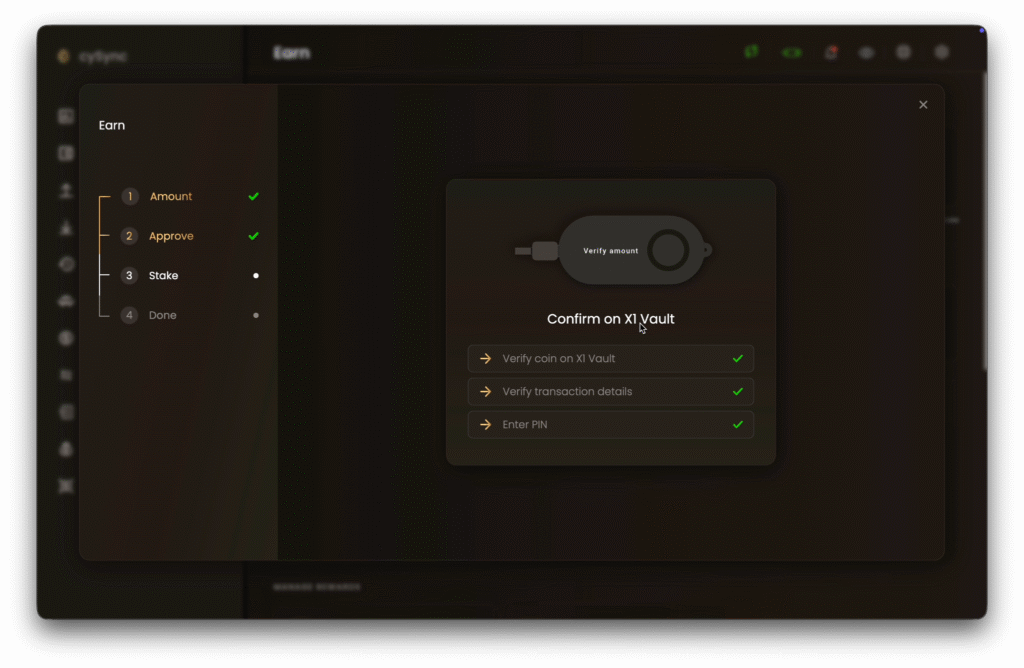
Confirm the approval on the X1 Vault. cySync then waits for the approval transaction to confirm on-chain and shows its hash.
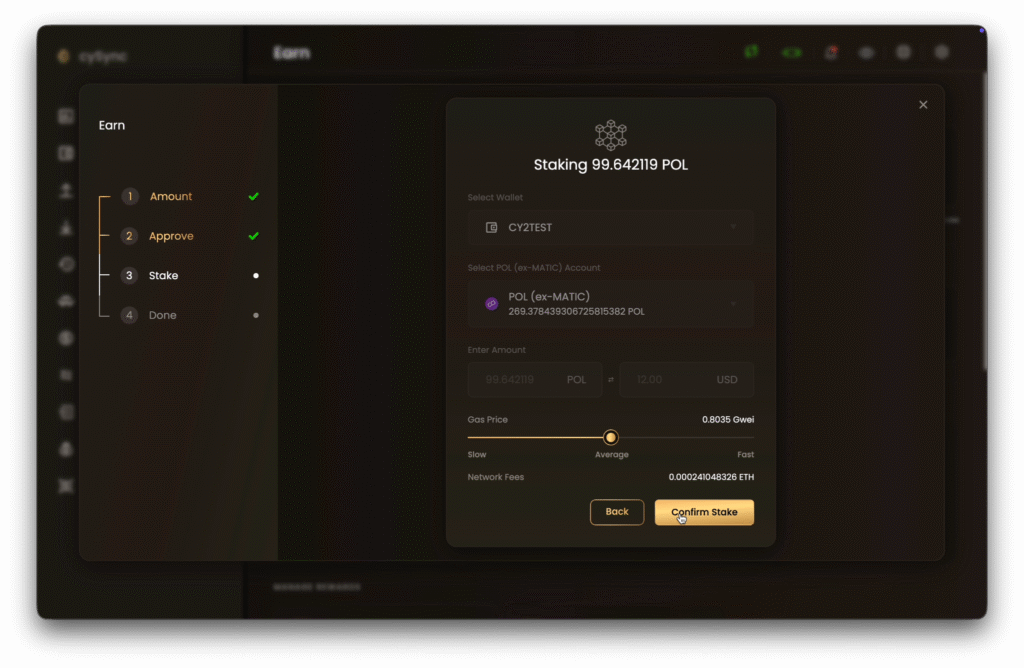
Step 7. Confirm the Stake
Review the summary: the POL amount, wallet and account. Set the network fee with the Gas Price slider and click Confirm Stake.
Step 8. Sign on the X1 Vault
Follow the prompts on the X1 Vault:
- Verify the coin on the X1 Vault.
- Verify the transaction details, including the amount.
- Enter your PIN
- Tap an X1 Card on the X1 Vault and enter PIN again.
Step 9. Check the Result
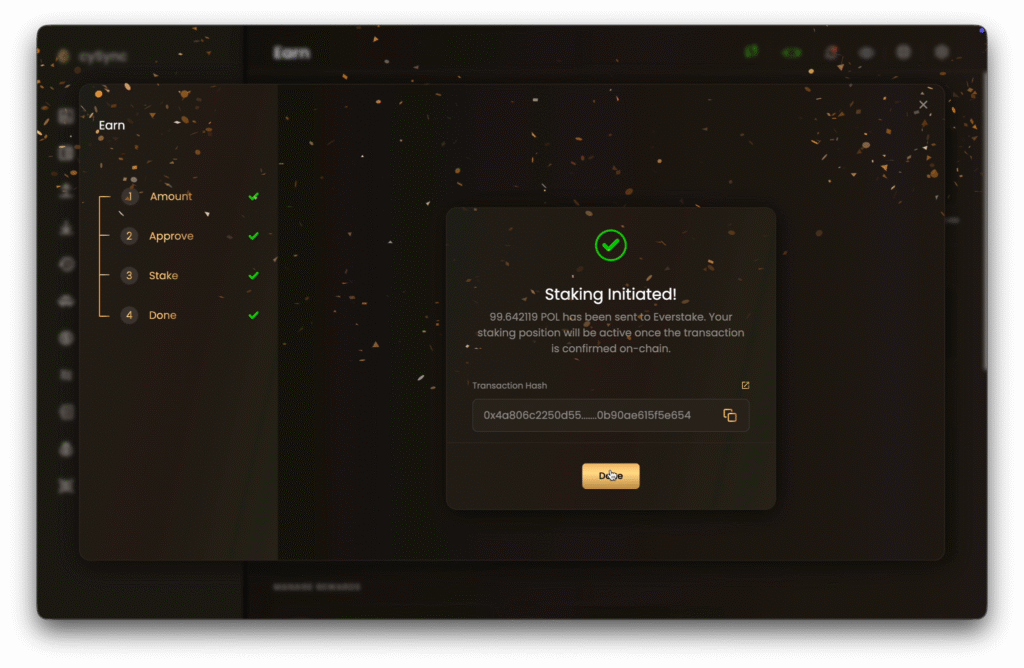
The Staking Initiated screen confirms that stake with Everstake. Your staking position becomes active once the transaction is confirmed on-chain. Note: Staking is non-custodial, meaning Everstake has no access to the funds in your wallet.
Copy the Transaction Hash or open it in a block explorer, then click Done.
How to Manage Your Staked POL
Go to Earn, click Manage on your POL account and use the actions on the stake page. Every action is signed on the X1 Vault.
| Action | Section | What it does |
| Stake POL | Manage Stake | Delegates more POL to Everstake |
| Unstake POL | Manage Stake | Withdraws POL from your staked position and starts the unbonding period |
| Claim unstaked | Manage Stake | Moves POL that has cleared unbonding back to your wallet |
| Claim or restake rewards | Manage Rewards | Moves accrued rewards to your wallet or adds them to your stake |
Unstaked POL shows under Unbonding until the protocol releases it. It then moves to Ready to claim.
FAQ
Why Do I Need ETH to Stake POL?
POL staking runs through contracts on Ethereum, so the approval and stake transactions pay network fees in ETH. Keep a small ETH balance on the same Ethereum account.
Why Is There an Extra Approval Step?
The staking contract needs permission to use your POL before the first stake. The approval is a one-time transaction per account.
Do My Private Keys Leave the Cypherock X1?
No. Every staking transaction is verified and signed on the X1 Vault, and Everstake never has access to your private key.
When Does My Stake Start Accruing Rewards?
Your position becomes active once the stake transaction is confirmed on-chain. The amount then shows under Actively staked on the stake page.
Can I Unstake POL at Any Time?
Yes. Click Unstake POL on the stake page, wait for the unbonding period (about 2-3 days) set by the protocol, then click Claim unstaked.
Which Other Assets Can I Stake in cySync?
Cypherock X1 owners can also stake ETH and SOL with Everstake in cySync. The flow follows the same steps.
Share with your network